Running NVIDIA Dynamo on Two DGX Sparks with K3s
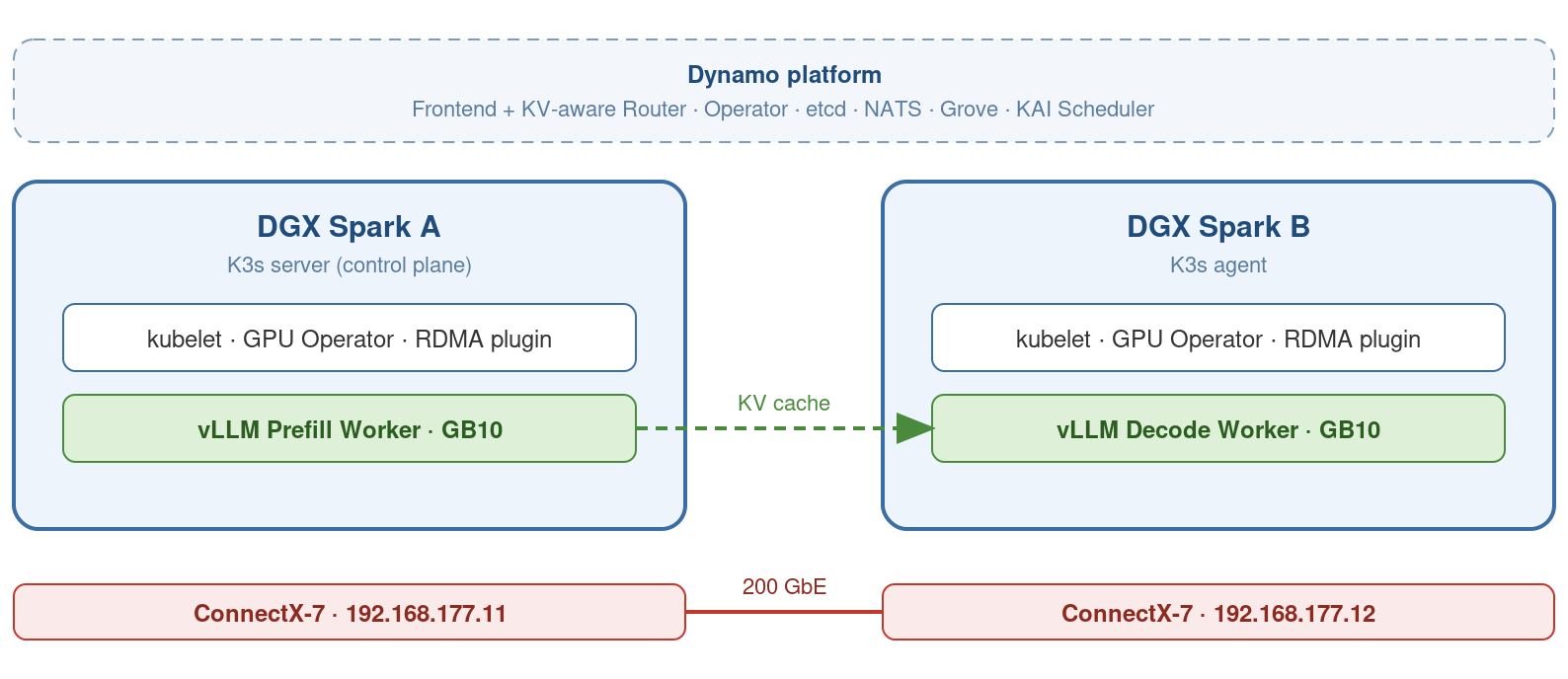
This guide builds a two-node NVIDIA Dynamo cluster on two DGX Sparks connected through the direct ConnectX-7 link. It deploys separate vLLM prefill and decode workers and verifies that KV-cache traffic moves between them through NIXL and UCX over RDMA.
The focus is reproducibility. This guide is the distilled result of setting this up, including the configuration choices that prevent the failure modes you’d otherwise spend days debugging.
What you’ll build
By the end of this guide, you’ll have:
- A 2-node K3s cluster whose node identity and pod networking are pinned to the direct ConnectX-7 link.
- NVIDIA GPU Operator exposing one GB10 GPU on each DGX Spark.
- The NVIDIA Dynamo platform, including the operator, etcd, NATS, Grove for gang scheduling, and KAI Scheduler for GPU-aware placement.
- The official disaggregated serving sample running with the prefill worker on one Spark and the decode worker on the other, with KV-cache transfer over the ConnectX-7 link verified end-to-end.
Contents
- Tested configuration
- Prerequisite: Connect the ConnectX-7 link
- Part 1: Host preparation
- Part 2: K3s
- Part 3: GPU Operator
- Part 4: Dynamo platform
- Part 5: Run the official disaggregated sample
- What’s next?
- References
- Appendix: Teardown
Tested configuration
| Component | Version |
|---|---|
| DGX OS | Ubuntu 24.04.4 LTS, kernel 6.17.0-1029-nvidia |
| K3s | v1.36.2+k3s1 |
| NVIDIA driver | 580.173.02 (CUDA 13.0) |
| NVIDIA Container Toolkit | 1.19.1-1 |
| GPU Operator chart | gpu-operator-v26.3.3 (app v26.3.3) |
| Dynamo | 1.2.1 |
| Grove | v0.1.0-alpha.8 (installed by the Dynamo chart) |
| KAI Scheduler | v0.13.4 (installed by the Dynamo chart) |
| RDMA shared device plugin | v1.5.4 |
| Runtime image | nvcr.io/nvidia/ai-dynamo/vllm-runtime:1.2.1 |
Prerequisite: Connect the ConnectX-7 link
Before anything Kubernetes, wire and configure the 200 GbE link between the two machines. Follow NVIDIA’s official playbook Connect Two Sparks: it walks through plugging the QSFP cable, configuring the interfaces via netplan with static IPs, and setting up passwordless SSH. This guide assumes the playbook’s result: node A at 192.168.177.11, node B at 192.168.177.12.
Verify the link before continuing, since everything below depends on it:
# the cabled CX-7 interface (the Spark exposes four CX-7 netdevs, only the
# UP one with your 177.x address matters, here enp1s0f1np1):
ip -br addr | grep 192.168.177

ethtool enp1s0f1np1 | grep -E 'Speed|Link detected'   # 200000Mb/s, Link: yes
ping -c3 192.168.177.12                               # sub-millisecond replies
Part 1: Host preparation (run on BOTH Sparks)
Run every step in this part on both machines. The sections below are the “why” behind each block.
1.1 Raise inotify limits
Kubernetes watches thousands of files. Ubuntu’s defaults run out within days and produce confusing “too many open files” errors:
sudo tee /etc/sysctl.d/99-k8s-inotify.conf <<'EOF'
fs.inotify.max_user_instances = 8192
fs.inotify.max_user_watches = 1048576
EOF
sudo sysctl --system
1.2 Make CDI specs survive reboots
The GPU Operator injects GPUs into containers via CDI device specs. The
default location /var/run/cdi is a tmpfs, erased on every reboot, after
which every GPU pod crash-loops with
unresolvable CDI devices management.nvidia.com/gpu=all.
Current NVIDIA Container Toolkit releases automatically regenerate the
standard nvidia.com/gpu CDI specification under /var/run/cdi through
nvidia-cdi-refresh. Enable the service and its path unit, which is what
watches for driver and toolkit changes:
sudo systemctl enable --now nvidia-cdi-refresh.service nvidia-cdi-refresh.pathIn the tested DGX Spark configuration, GPU Operator components also requested
management.nvidia.com/gpu=all. That additional specification was not
regenerated automatically, so this guide creates it persistently under
/etc/cdi. The --vendor flag is essential: without it the spec collides
with the regular one and both break.
sudo mkdir -p /etc/cdi
sudo nvidia-ctk cdi generate --mode=management \
  --vendor=management.nvidia.com --class=gpu \
  --output=/etc/cdi/management.nvidia.com-gpu.yaml

nvidia-ctk cdi list | grep management.nvidia.com/gpu=all   # must print one line
Written to /etc/cdi it survives reboots. Note for later, though: it embeds
the driver version in its paths, so after a driver or CUDA update regenerate
it with the same command, otherwise GPU pods fail with the same
unresolvable-device error for a new reason.
1.3 Clamp TCP MSS for pod egress
Pods will inherit the CX-7’s jumbo MTU (flannel ≈ 8950), but internet traffic leaves through a 1500-MTU NIC. Without this rule, pods reach some sites but hang forever on others (typically CDNs, mid-download), while the same curl works fine from the host. One rule fixes it per-route and keeps jumbo frames on the CX-7:
sudo iptables -t mangle -A FORWARD -p tcp --tcp-flags SYN,RST SYN \
  -j TCPMSS --clamp-mss-to-pmtu
iptables-persistent is not enough here: its ruleset is restored early in
boot and K3s rebuilds netfilter state afterwards, dropping the rule. Re-add it
after K3s starts, with an idempotent oneshot unit:
sudo tee /etc/systemd/system/mss-clamp.service <<'EOF'
[Unit]
Description=Clamp TCP MSS to PMTU for pod egress
After=k3s.service k3s-agent.service network-online.target
Wants=network-online.target

[Service]
Type=oneshot
RemainAfterExit=yes
ExecStart=/bin/sh -c 'iptables -t mangle -C FORWARD -p tcp --tcp-flags SYN,RST SYN -j TCPMSS --clamp-mss-to-pmtu 2>/dev/null || iptables -t mangle -A FORWARD -p tcp --tcp-flags SYN,RST SYN -j TCPMSS --clamp-mss-to-pmtu'

[Install]
WantedBy=multi-user.target
EOF

sudo systemctl daemon-reload && sudo systemctl enable --now mss-clamp.service
sudo iptables -t mangle -L FORWARD -n -v | grep TCPMSS    # verify, also after a reboot
1.4 Raise the memlock limit for RDMA
UCX pins (locks) large memory regions when it registers KV-cache buffers with
the HCA. The default RLIMIT_MEMLOCK of 8 MB makes that fail with
ibv_reg_mr ... Cannot allocate memory, and the worker crash-loops.
CAP_IPC_LOCK alone does not help: capabilities granted through
securityContext are not effective for a container running as a non-root
user, which the Dynamo worker does. Kubernetes has no per-pod ulimit field, so
raise it on the service that ultimately spawns the containers. Write the
drop-in now, before K3s is installed in Part 2, so the service picks it up on
first start.
On Spark A (K3s server):
sudo mkdir -p /etc/systemd/system/k3s.service.d
sudo tee /etc/systemd/system/k3s.service.d/memlock.conf <<'EOF'
[Service]
LimitMEMLOCK=infinity
EOF
sudo systemctl daemon-reload
On Spark B (K3s agent):
sudo mkdir -p /etc/systemd/system/k3s-agent.service.d
sudo tee /etc/systemd/system/k3s-agent.service.d/memlock.conf <<'EOF'
[Service]
LimitMEMLOCK=infinity
EOF
sudo systemctl daemon-reload
If K3s is already running when you add this, restart it (sudo systemctl restart k3s on the server, k3s-agent on the agent). Verify later from
inside a worker with ulimit -l, which must print unlimited.
1.5 Pre-seed the model cache
In-pod model downloads are single-stream and give up after ~3.5 minutes, a race you can lose on ordinary networks. Downloading once on each host, in parallel, removes models from the failure surface entirely, and worker init is faster:
sudo mkdir -p /var/lib/hf-cache && sudo chmod a+rwX /var/lib/hf-cache

# a venv keeps this off the system Python, which on DGX OS already has
# transformers and friends pinned to specific huggingface_hub versions
python3 -m venv ~/.venv/hf && ~/.venv/hf/bin/pip install -q -U huggingface_hub

HF_HOME=/var/lib/hf-cache HF_XET_HIGH_PERFORMANCE=1 \
  ~/.venv/hf/bin/hf download Qwen/Qwen3-0.6B

sudo chmod -R a+rwX /var/lib/hf-cache(HF_XET_HIGH_PERFORMANCE replaces the older HF_HUB_ENABLE_HF_TRANSFER,
which current versions ignore.)
Also create a directory for vLLM’s compile cache. vLLM stores torch.compile
artifacts under ~/.cache/vllm inside the container, which is ephemeral, so
without a mount every pod restart recompiles for several minutes. Persisting
it cuts warm restarts to roughly 1-2 minutes. (hostPath mounts ignore the
pod’s fsGroup and the worker runs as a non-root user, hence the open
permissions.)
sudo mkdir -p /var/lib/vllm-cache && sudo chmod a+rwX /var/lib/vllm-cacheFor a two-node lab, hostPath plus per-node seeding is defensible. For
anything shared or audited, start with PVCs or supplementalGroups.
Part 2: K3s
Topology: one server + one agent
This example uses a single K3s server with its default SQLite datastore, plus one agent. Dynamo separately deploys its own etcd pod for worker discovery, which is unrelated to the K3s datastore.
2.1 Server (Spark A)
sudo mkdir -p /etc/rancher/k3s
sudo tee /etc/rancher/k3s/config.yaml <<'EOF'
disable:
  - traefik        # bundled ingress: occupies 80/443, not wanted here
  - servicelb      # bundled LB: fights other implementations over Service IPs
node-ip: 192.168.177.11
advertise-address: 192.168.177.11
flannel-iface: enp1s0f1np1
flannel-backend: host-gw
tls-san:
  - 192.168.177.11
write-kubeconfig-mode: "0644"
EOF

curl -sfL https://get.k3s.io | sh -s - server
Three settings deserve emphasis. node-ip pins the control plane to the CX-7,
and flannel-iface pins the pod network: flannel otherwise follows the
default route, so pod-to-pod traffic silently rides the slow internet NIC
while everything appears to work.
flannel-backend: host-gw replaces the default VXLAN tunnel with plain kernel
routes. Two nodes on a direct cable are layer-2 adjacent, so the tunnel buys
nothing, and it costs something specific here: the VXLAN backend creates a
flannel.1 interface stacked on the CX-7, and every stacked interface with an
IP registers additional RoCE GID entries on the same RDMA device. UCX then has
several candidate GIDs, picks one from the pod network, and the NIXL handshake
fails with IP addresses do not match or not routable. With host-gw there is
no flannel.1, each RDMA device carries only its own address, and GID
selection is unambiguous on both nodes.
Grab the join token:
sudo cat /var/lib/rancher/k3s/server/node-token2.2 Agent (Spark B)
sudo mkdir -p /etc/rancher/k3s
sudo tee /etc/rancher/k3s/config.yaml <<'EOF'
node-ip: 192.168.177.12
flannel-iface: enp1s0f1np1
EOF

curl -sfL https://get.k3s.io | \
  K3S_URL=https://192.168.177.11:6443 K3S_TOKEN=<token> sh -s - agent
flannel-backend is not repeated here: it is a server-scope setting, and the
agent receives the backend configuration from the server. flannel-iface is
per-node and does belong in both files.
2.3 Verify
All kubectl commands run on the server (the agent has no kubeconfig):
kubectl get nodes -o wide
# Both Ready, INTERNAL-IP must be 192.168.177.11 / .12

kubectl get nodes -o jsonpath='{range .items[*]}{.metadata.name}: {.metadata.annotations.flannel\.alpha\.coreos\.com/public-ip}{"\n"}{end}'
# Both must print their 192.168.177.x address, confirming flannel-iface took
On each node, confirm host-gw is in effect: no tunnel device, and the other node’s pod subnet routed directly over the CX-7.
ip -br link | grep flannel      # no flannel.1
ip route | grep 10.42           # 10.42.x.0/24 via 192.168.177.y dev enp1s0f1np1
show_gids | grep 192.168.177    # only this address on the RDMA device
Part 3: GPU Operator
DGX OS already provides the driver and container toolkit on the host, so the operator must manage neither: enabling them causes duplicate runtimes and validator crash loops:
helm repo add nvidia https://helm.ngc.nvidia.com/nvidia && helm repo update
helm install gpu-operator nvidia/gpu-operator \
  -n gpu-operator --create-namespace \
  --set driver.enabled=false \
  --set toolkit.enabled=false
Verify
kubectl get pods -n gpu-operator
# validators: Completed/Running. device-plugin, gfd, dcgm: Running on BOTH nodes

kubectl get nodes -o custom-columns='NODE:.metadata.name,GPU:.status.allocatable.nvidia\.com/gpu'
# NODE            GPU
# <spark-a-name>  1
# <spark-b-name>  1
The definitive functional test is nvidia-smi inside a pod on each node:
for NODE in <spark-a-name> <spark-b-name>; do
kubectl run gpu-test-$NODE --rm -i --restart=Never \
  --image=nvcr.io/nvidia/cuda:13.0.0-base-ubuntu24.04 \
  --overrides="{\"spec\":{\"nodeName\":\"$NODE\",\"runtimeClassName\":\"nvidia\",\"containers\":[{\"name\":\"t\",\"image\":\"nvcr.io/nvidia/cuda:13.0.0-base-ubuntu24.04\",\"command\":[\"nvidia-smi\"],\"resources\":{\"limits\":{\"nvidia.com/gpu\":\"1\"}}}]}}"
done
Success is the familiar nvidia-smi table, printed once per node, listing
NVIDIA GB10 and your driver version. Failures are equally recognisable, and
each points at a specific step:
| What you see | What it means |
|---|---|
Pod stays Pending, Insufficient nvidia.com/gpu | the device plugin is not advertising GPUs, so the GPU Operator is unhealthy. Check kubectl get pods -n gpu-operator |
unresolvable CDI devices management.nvidia.com/gpu=all | the CDI management spec is missing on that node (Part 1.2) |
Failed to initialize NVML: could not load NVML library | the container did not get the NVIDIA runtime. Check kubectl get runtimeclass and that the toolkit is present on the host |
ErrImagePull / no matching manifest | the node cannot reach nvcr.io, or the image tag has no arm64 build |
Part 4: Dynamo platform
Pin one version everywhere: Helm chart, repo checkout, and runtime image tag must match (this guide uses 1.2.1, substitute the current release from the link at the end). Set etcd and NATS installation explicitly: without them the operator has no discovery plane and workers never register:
export DYNAMO_VERSION=1.2.1        # match a release, see link at the end
export NAMESPACE=dynamo-system
export HF_TOKEN=<hf_XYZ>           # your HuggingFace token

helm fetch https://helm.ngc.nvidia.com/nvidia/ai-dynamo/charts/dynamo-platform-${DYNAMO_VERSION}.tgz
helm install dynamo-platform dynamo-platform-${DYNAMO_VERSION}.tgz \
  -n $NAMESPACE --create-namespace \
  --set global.etcd.install=true \
  --set global.nats.install=true \
  --set "global.grove.install=true" \
  --set "global.kai-scheduler.install=true"
This guide uses Grove for multinode orchestration and KAI for GPU-aware placement. Grove or another supported multinode orchestrator is required (LeaderWorkerSet with Volcano is the documented alternative). KAI is recommended for this topology and is installed here as part of the tested configuration.
Verify
kubectl get pods -n $NAMESPACE
# Running: dynamo-operator-controller-manager, dynamo-platform-etcd-0,
#          dynamo-platform-nats-0, grove-operator, kai-scheduler (+controllers)

kubectl get crd | grep dynamo
# dynamographdeployments, dynamocomponentdeployments, ... present

kubectl exec dynamo-platform-etcd-0 -n $NAMESPACE -- etcdctl endpoint health
# 127.0.0.1:2379 is healthy
Part 5: Run the official disaggregated sample
Disaggregated serving is Dynamo’s signature architecture: a prefill worker processes prompts on one Spark, a decode worker generates tokens on the other, and the KV cache moves between them via NIXL over the CX-7. Agentic traffic is its natural fit: agents constantly inject long tool outputs (prefill-heavy bursts) while other sessions are mid-generation (latency-sensitive decode), and disaggregation stops the bursts from stalling the streams.
Set expectations before deploying it, though. Disaggregation is not automatically faster: it pays off with long prompts, high concurrency, large models and a fast KV transfer path, and it can lose to a single aggregated worker without them. Qwen3-0.6B is used here because it starts quickly and makes the data path easy to validate, not because two-node disaggregation is expected to beat one aggregated worker on it. The goal in this part is architectural validation: prove the pipeline and the RDMA transfer work. Performance comparisons come later, with a model worth disaggregating.
5.1 Pre-pull the vLLM container image
Pre-pull the runtime image (about 13 GB) on both nodes, so the first deployment skips its longest step.
sudo k3s ctr images pull nvcr.io/nvidia/ai-dynamo/vllm-runtime:${DYNAMO_VERSION}
sudo k3s ctr images ls | grep vllm-runtime      # verify it's in the cache
5.2 Create the token secret
kubectl create secret generic hf-token-secret \
  --from-literal=HF_TOKEN="$HF_TOKEN" -n $NAMESPACE
Careful with the secret: envFromSecret in the deployment YAML takes the
secret’s name (hf-token-secret), never the token itself.
5.3 Prepare Dynamo template for DGX Spark
Clone the repository at the tag matching your platform version:
git clone --depth 1 --branch v${DYNAMO_VERSION} https://github.com/ai-dynamo/dynamo
cd dynamo/examples/backends/vllm/deploy
The official sample is disagg.yaml, a Frontend plus two workers
(VllmDecodeWorker and VllmPrefillWorker). The stock file references the
runtime image with a my-tag placeholder. Replace all three occurrences with
the version you exported in Part 4:
sed -i "s|vllm-runtime:my-tag|vllm-runtime:${DYNAMO_VERSION}|g" disagg.yaml
grep -n 'vllm-runtime:' disagg.yaml     # three lines, all on your version
Double quotes here, so the shell expands ${DYNAMO_VERSION} and the manifest
ends up with the literal tag: explicit about what it deploys, and appliable
and committable as is.
Three changes are required, inside extraPodSpec.mainContainer (flags in
service-level args are overridden by mainContainer, they must live here):
--gpu-memory-utilizationon both workers. The GB10’s 128 GB is unified memory, shared with the OS and everything else on the box. On the tested Sparks, vLLM’s default allocation target exceeded the currently available unified memory, and the engine exited withFree memory ... is less than desired GPU memory utilization. A value of0.5provided a reliable starting point. Adjust it based onfree,nvidia-smi, model size, context length, and concurrent host workloads.- Mount the pre-seeded caches on both workers, so the model is never downloaded and torch.compile artifacts survive restarts.
--kv-transfer-configon the decode worker. In thev1.2.1checkout I tested,disagg.yamlconfigured the connector only on the prefill worker. The decode worker accepted requests but logged that no KV connector was available and performed the prefill locally:Got kv_transfer_params, but no KVConnector found. Disabling KVTransfer. The deployment looks healthy and answers requests, but both engines report the same prompt throughput for a single request, and no KV cache ever crosses the wire. The repository’s own bare-metal launch script (examples/backends/vllm/launch/disagg.sh) passes the flag to both workers, so copy the prefill worker’s line to decode.
The adapted worker sections (Frontend needs only the image tag, as in the stock file):
    VllmDecodeWorker:
      envFromSecret: hf-token-secret
      componentType: worker
      replicas: 1
      resources:
        limits: { gpu: "1" }
      extraPodSpec:
        mainContainer:
          image: nvcr.io/nvidia/ai-dynamo/vllm-runtime:1.2.1
          workingDir: /workspace/examples/backends/vllm
          command: [python3, -m, dynamo.vllm]
          args:
            - --model
            - Qwen/Qwen3-0.6B
            - --disaggregation-mode
            - decode
            - --kv-transfer-config          # missing in the stock sample
            - '{"kv_connector":"NixlConnector","kv_role":"kv_both"}'
            - --gpu-memory-utilization
            - "0.5"
          volumeMounts:
            - name: hf-cache
              mountPath: /home/dynamo/.cache/huggingface
            - name: vllm-cache
              mountPath: /home/dynamo/.cache/vllm
        volumes:
          - name: hf-cache
            hostPath: { path: /var/lib/hf-cache, type: Directory }
          - name: vllm-cache
            hostPath: { path: /var/lib/vllm-cache, type: Directory }
    VllmPrefillWorker:
      envFromSecret: hf-token-secret
      componentType: worker
      replicas: 1
      resources:
        limits: { gpu: "1" }
      extraPodSpec:
        mainContainer:
          image: nvcr.io/nvidia/ai-dynamo/vllm-runtime:1.2.1
          workingDir: /workspace/examples/backends/vllm
          command: [python3, -m, dynamo.vllm]
          args:
            - --model
            - Qwen/Qwen3-0.6B
            - --disaggregation-mode         # stock flags, keep as they are
            - prefill
            - --kv-transfer-config
            - '{"kv_connector":"NixlConnector","kv_role":"kv_both"}'
            - --gpu-memory-utilization
            - "0.5"
          volumeMounts:
            - name: hf-cache
              mountPath: /home/dynamo/.cache/huggingface
            - name: vllm-cache
              mountPath: /home/dynamo/.cache/vllm
        volumes:
          - name: hf-cache
            hostPath: { path: /var/lib/hf-cache, type: Directory }
          - name: vllm-cache
            hostPath: { path: /var/lib/vllm-cache, type: Directory }
Keep the stock file’s remaining flags intact (check your checkout’s
disagg.yaml, flag names evolve between releases). Add only the memory flag
and the cache mount. The cache must be pre-seeded on both hosts, since
each Spark runs one worker.
5.4 Configure RDMA for the KV transfer
Without further configuration the KV transfer would fall back to TCP through the pod network: NIXL/UCX picks the fastest transport visible inside the pod, and a default pod sees only its veth interface, no RDMA devices. Configure RDMA now, before the first deployment, so the sample uses the machines’ capabilities fully from the start.
Device access is granted via the
k8s-rdma-shared-dev-plugin,
not by mounting /dev/infiniband or running privileged. A hostPath mount is
not enough (the container’s device cgroup still blocks opening the device
files), and privileged: true disables container isolation entirely and is
rejected by Pod Security admission on shared clusters. The device plugin
whitelists exactly the RDMA devices, nothing else.
Install the plugin (one apply, the DaemonSet runs on both nodes automatically):
git clone --depth 1 https://github.com/Mellanox/k8s-rdma-shared-dev-plugin
cd k8s-rdma-shared-dev-plugin/deployment/k8s/base
In configmap.yaml, select the cabled CX-7 netdev:
{"configList": [{"resourceName": "rdma_shared_device_a",
                 "rdmaHcaMax": 63,
                 "selectors": {"ifNames": ["enp1s0f1np1"]}}]}
The upstream manifest references the image without a tag, which resolves to
latest. Pin it in kustomization.yaml, so the version is recorded and a
git pull does not silently change it:
images:
  - name: ghcr.io/mellanox/k8s-rdma-shared-dev-plugin
    newTag: v1.5.4
Then apply and verify:
kubectl apply -k .

kubectl get ds rdma-shared-dp-ds -n kube-system \
  -o jsonpath='{.spec.template.spec.containers[0].image}{"\n"}'   # ...:v1.5.4

kubectl get pods -n kube-system | grep rdma       # 1/1 Running on each node
kubectl get nodes -o custom-columns='NODE:.metadata.name,RDMA:.status.allocatable.rdma/rdma_shared_device_a'
# 63 on both nodes. Do not continue until this shows up.
rdma/rdma_shared_device_a is not a standardized resource name.
Plugin log lines like missing RDMA device spec for the Realtek and Wi-Fi
NICs are expected, those devices have no RDMA capability.
Next, find the RDMA device name of the cabled CX-7 port, on both hosts. Note
that DGX OS uses netdev-based RDMA naming (rocep...), not the classic
mlx5_X:
ibdev2netdev # example output on DGX Spark: rocep1s0f1 port 1 ==> enp1s0f1np1 (Up)UCX_NET_DEVICES takes <device>:<port> from the line whose netdev is your
cabled CX-7 interface, so in this example: rocep1s0f1:1.
Then extend both workers in disagg.yaml. The rdma/... resource limit
is what triggers the device injection:
      resources:
        limits:
          gpu: "1"
          custom:
            rdma/rdma_shared_device_a: "1"
      extraPodSpec:
        hostNetwork: true
        dnsPolicy: ClusterFirstWithHostNet
        mainContainer:
          # ... image, command, args, cache mounts as before ...
          env:
            - name: UCX_NET_DEVICES
              value: <device>:<port>   # from ibdev2netdev, e.g. rocep1s0f1:1
            - name: VLLM_NIXL_SIDE_CHANNEL_HOST
              valueFrom:
                fieldRef:
                  fieldPath: status.hostIP
          securityContext:
            capabilities:
              add: ["IPC_LOCK"]
IPC_LOCK is the capability for locking memory into RAM, which RDMA requires
because the NIC reads registered buffers directly and they must not be swapped
out. It pairs with the memlock limit raised in Part 1.4. The limit sets how
much a process may lock, the capability allows exceeding it.
hostNetwork: true is what makes RoCE addressing work. RoCE derives its GIDs
(Global Identifiers) from the IP addresses on the netdev backing the HCA, and
a pod in its own
network namespace sees only its veth (virtual Ethernet device), never the
CX-7 interface. The device
plugin grants device access, host networking supplies the addressing.
That also creates a trap. In host networking the worker inherits all host
interfaces and picks the one the default route suggests, which is the
internet-facing NIC, not the CX-7. The NIXL side channel would then negotiate
over the slow link. VLLM_NIXL_SIDE_CHANNEL_HOST pins it, and reading it from
status.hostIP via the downward API keeps both workers identical: the
downward API returns the node’s InternalIP, which is the CX-7 address because
Part 2 set node-ip accordingly. Section 5.6 verifies that it resolved
correctly once the pods are running.
5.5 Deploy and watch it come up
kubectl apply -f disagg.yaml -n $NAMESPACE
kubectl get dynamographdeployment,pods -n $NAMESPACE
Expected sequence: three pods appear, briefly SchedulingGated while Grove
assembles the gang. In the tested configuration, with a single GPU per node
and one GPU requested per worker, the scheduler placed prefill and decode on
different Sparks. The workers pull the runtime image (about 13 GB,
first time only, skipped if you pre-pulled it), load the model from the local
cache, and spend a few minutes in vLLM init. Then:
kubectl get dynamographdeployment -n $NAMESPACE
# NAME          READY   ...
# vllm-disagg   True

kubectl get pods -n $NAMESPACE -o wide | grep vllm
# prefill worker on one node, decode worker on the other, one GPU each
While waiting, pod states map cleanly to phases: ContainerCreating = image
pull (kubectl describe pod shows the Pulling event) · Running 0/1 = model
load + engine init (kubectl logs -f shows progress) · CrashLoopBackOff =
read kubectl logs --previous.
5.6 Verify the disaggregated workload
First confirm RDMA is actually in use. Each of these must pass:
# 1. RDMA device visible and active inside the worker:
kubectl exec <decode-worker-pod> -n $NAMESPACE -- ibv_devinfo | grep -E 'hca_id|state'
# your <device> listed with state: PORT_ACTIVE

# 2. UCX sees RDMA transports, not just tcp:
kubectl exec <decode-worker-pod> -n $NAMESPACE -- ucx_info -d | grep -E 'Transport: (rc|dc|ud)' | head
# rc/dc entries present → RDMA path available

# 2b. memlock limit lifted (Part 1.4), otherwise UCX fails to register memory:
kubectl exec <decode-worker-pod> -n $NAMESPACE -- sh -c 'ulimit -l'
# unlimited

# 2c. the NIXL side channel resolved to the CX-7 address, not the egress NIC:
kubectl exec <prefill-worker-pod> -n $NAMESPACE -- printenv VLLM_NIXL_SIDE_CHANNEL_HOST
# 192.168.177.11, and .12 in the decode pod

# 3. NIXL confirms at runtime:
kubectl logs <decode-worker-pod> -n $NAMESPACE | grep -i -E 'nixl|ucx'
# transfer backend should reference the RDMA-capable device, not sockets
If step 1 prints Failed to open device, the rdma/... resource limit did
not reach the container, so no device injection happened. Verify it with
kubectl get podclique ... -o yaml | grep rdma. If devices open fine but the
transfer still runs over TCP, the usual cause is a UCX_NET_DEVICES value
that does not match the actual device name from ibdev2netdev.
Then the inference round-trip. port-forward blocks the terminal, so
background it:
kubectl get svc -n $NAMESPACE | grep frontend     # confirm the service name
kubectl port-forward svc/vllm-disagg-frontend 8000:8000 -n $NAMESPACE >/dev/null 2>&1 &

curl localhost:8000/v1/models
curl localhost:8000/v1/chat/completions -H 'Content-Type: application/json' -d '{
  "model": "Qwen/Qwen3-0.6B",
  "messages": [{"role": "user", "content": "Say hi from a two-Spark cluster."}],
  "max_tokens": 50}'
A completion back proves the frontend, the router and the decode worker.
Dynamo decides per request whether remote prefill is worth it. Short prompts
and prompts with a high prefix-cache hit rate are handled by the decode worker
alone, since there is little or nothing left to transfer. That is an
optimisation, not a failure, and it makes a single small curl a poor test of
the data path. The usage object in the response shows the second case as
cached_tokens.
To exercise the disaggregated path, send many concurrent requests with long, unique prompts:
cat > /tmp/load.sh <<'EOF'
#!/usr/bin/env bash
URL=${URL:-http://localhost:8000/v1/chat/completions}
N=${1:-40}
for i in $(seq 1 "$N"); do
  P="req-$i-$(head -c 48 /dev/urandom | base64 | tr -d '\n=') $(python3 -c "print('filler tokens for a long prompt. ' * 900)")"
  curl -s --max-time 300 "$URL" -H 'Content-Type: application/json' \
    -d "{\"model\":\"Qwen/Qwen3-0.6B\",\"messages\":[{\"role\":\"user\",\"content\":\"$P\"}],\"max_tokens\":128}" \
    -o /dev/null &
  sleep 0.1
done
wait
echo "done: $N requests"
EOF
chmod +x /tmp/load.sh
Each prompt is roughly 5,400 tokens and carries a random prefix, so the prefix cache cannot short-circuit it, and 40 in flight keep the decode worker busy enough that offloading prefill is the cheaper choice. For repeatable load with proper metrics, rather than a shell loop, use AIPerf.
Now the hard evidence. These counters increment only for RoCE traffic, so TCP activity on the same interface does not affect them:
# on the prefill node (ships the KV blocks):
C=/sys/class/infiniband/<device>/ports/1/counters
cat $C/port_xmit_data        # 4-byte words, note the value

/tmp/load.sh 40

cat $C/port_xmit_data        # must have jumped by gigabytes

# on the decode node (receives them), before and after the same run:
cat /sys/class/infiniband/<device>/ports/1/counters/port_rcv_data
<device> is the RDMA device from ibdev2netdev in 5.4, rocep1s0f1 on
these machines. Both counters must jump, and the byte counts should be in the
same ballpark as the KV cache those requests produced. The prefill worker’s
log is the corroborating view: it prints request received per request it
actually handles.
Flat counters plus successful responses mean the transfer silently fell back,
so re-check the decode worker’s --kv-transfer-config (5.3) and
UCX_NET_DEVICES.
5.7 Reboot to verify persistence
Power-cycle both machines and confirm everything returns without intervention:
both nodes Ready, GPU operator validators pass, platform pods recover, the
DGD returns to Ready: True. This single test proves all the persistent
pieces (CDI specs in /etc/cdi, MSS clamp, sysctls, static IPs, enabled
services), exactly the things that fail weeks later if configured only in
memory.
What’s next?
With the platform running, swap the toy model for something with real weight, e.g. Nemotron Super, and work through an escalating benchmark series.
The series starts from the aggregated baseline and adds one capability at a time: disaggregation over TCP, then over RDMA, then KV-aware routing across both Sparks, then the agentic features on top, from nvext hints to session-aware routing and the Agentic Planner. Each step reuses the same traffic trace, so every delta is attributable to exactly one change. The intention is to establish which of these actually improve performance for agentic workloads on this hardware, rather than assuming they do.
References
- Dynamo Kubernetes installation guide
- Dynamo support matrix
- Connect Two Sparks playbook
- Dynamo agent hints (nvext) · agent tracing
- K3s docs: HA embedded etcd · networking
- NVIDIA GPU Operator docs
- k8s-rdma-shared-dev-plugin
- DGX Spark K3s GPU + Network Operator / RDMA reference
- Dynamo Releases
Appendix: Teardown
To rerun this guide from scratch or clean it up, remove the cluster and the host tuning. Uninstalling K3s takes the whole stack with it: the Dynamo platform, GPU Operator, RDMA device plugin, every Helm release, and the embedded containerd including the pulled runtime image.
Start on the agent node (Spark B), then repeat on the server node (Spark A):
# 1. K3s and all cluster state
sudo /usr/local/bin/k3s-agent-uninstall.sh      # server node: k3s-uninstall.sh
sudo rm -rf /etc/rancher/k3s /var/lib/rancher/k3s

# 2. systemd units and drop-ins added by this guide
sudo systemctl disable --now mss-clamp.service 2>/dev/null
sudo rm -f /etc/systemd/system/mss-clamp.service
sudo rm -rf /etc/systemd/system/k3s.service.d /etc/systemd/system/k3s-agent.service.d
sudo systemctl daemon-reload

# 3. host tuning
sudo rm -f /etc/sysctl.d/99-k8s-inotify.conf
sudo sysctl --system
sudo iptables -t mangle -D FORWARD -p tcp --tcp-flags SYN,RST SYN \
  -j TCPMSS --clamp-mss-to-pmtu 2>/dev/null

# 4. CDI management spec (Part 1.2 regenerates it)
sudo rm -f /etc/cdi/management.nvidia.com-gpu.yaml

# 5. optional: model and compile caches. Keep them and the rerun skips the
#    download; delete them for a fully cold run.
# sudo rm -rf /var/lib/hf-cache /var/lib/vllm-cache
Left untouched on purpose: the ConnectX-7 netplan configuration, the NVIDIA driver, and the container toolkit. Those come from DGX OS and the Connect Two Sparks playbook, not from this guide.